At this year's
ODTUG Kaleidoscope I gave a presentation called "Enhancing APEX Security". A copy of the presentation can be downloaded
here.
As part of the presentation I discussed how to create a "Poor Man's" VPD using Oracle XE. The main concept was to simulate basic VPD on a non Enterprise Edition (EE) (
VPD is only available on EE). This post will cover how to do this. Please note, since this is for demonstration purposes I have kept things very simple and it is by no means a complete solution.
Before you can review the code, we need to discuss some of the basic architecture and technology that will be used. I strongly encourage you to do some additional research on these topics if you plan to use this method in production.
Schema SetupAssuming you don't have Oracle EE, you'll need a way to secure your existing schema. Lets say you had a schema called "DEMO". You'll need to create a new schema called "DEMO_PUB". The DEMO_PUB schema will not contain any objects. Instead, it will have synonyms which point to views and packages in the DEMO schema. Note, the DEMO_PUB schema will not have any access to the DEMO tables. All DML statements will be made via packages and procedures. The views from the DEMO schema will be "secure views" which will restrict access to the data. On the flip-side the DEMO schema will only grant SELECT and EXECUTE to views and packages respectively, to the DEMO_PUB schema.
You APEX applications should use the DEMO_PUB so that security logic is stored in the database rather than the front-end. This should help prevent developers from displaying data that end users don't have access to.
The following diagram, taken from my presentation, highlights the overall schema structure.
 Contexts
For people unfamiliar with Contexts, the easiest way to describe them is a globally accessible container of name/value pairs. The container is only accessible if you have the correct key. Oracle has some great reference material on this (search for VPD or FGAC) so I won't cover this any further Here's a diagram to illustrate Contexts.
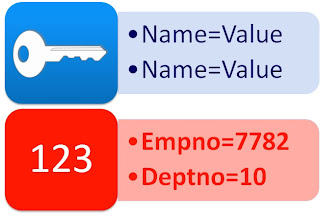
The key to "Poor Man's" VPD is to leverage context values in your views to restrict the data. To demonstrate this in pseudo code, if you wanted to restrict access on the EMP table to only employees in your department you'd write a view like this:
CREATE OR REPLACE VIEW vemp AS
SELECT * FROM emp
WHERE deptno = some_value_from_a_context
The CodeHopefully you understood the small bit of background information I wrote before. Here's how to implement a very simple "VPD" enabled application
-- Create Context
-- ctx_vpd is our context name
-- pkg_vpd is the only place where we can modify values in this context
--  This provides a lot of security since single access point
CREATE OR REPLACE CONTEXT ctx_vpd USING pkg_vpd ACCESSED GLOBALLY;
Create pkg_vpd spec
-- VPD Demo Package from www.talkapex.com
-- @author Martin Giffy D'Souza - martin@talkapex.com
CREATE OR REPLACE PACKAGE pkg_vpd
AS
   --
   -- Login function for APEX to login users
   -- Spec must be as is, as required by APEX for custom authentication schemes
   -- For demo purposes we'll use ENAME = ENAME from EMP
   -- @param p_username username
   -- @param p_password password
   -- @return TRUE or FALSE
   --
  FUNCTION f_login (p_username IN VARCHAR2, p_password IN VARCHAR2)
    RETURN BOOLEAN;

  --
  -- Set context identifier
  -- This will register our "key" which will be required each time we want to access a Context (name/value) pair
  -- @param p_session_key in APEX use :APP_USER || ':' || :APP_SESSION
  --
  PROCEDURE sp_set_context_identifier (p_session_key IN VARCHAR2);

  --
  -- Set context value
  -- i.e. Sets a value for the name/value pair
  --
  PROCEDURE sp_set_context_value (p_name IN VARCHAR2, p_value IN VARCHAR2);

  --
  -- Get Context Value
  -- i.e. Get value for name/value pair
  --
  FUNCTION f_get_context_value (p_name IN VARCHAR2)
    RETURN VARCHAR2;

    --
  -- To be run in Post Authentication Process in APEX
  -- Sets some of the name/value pairs required for VPD
  --
  PROCEDURE sp_apex_post_auth;

END pkg_vpd;
/
Create pkg_vpd body
-- VPD Demo Package from www.talkapex.com
-- @author Martin Giffy D'Souza - martin@talkapex.com

CREATE OR REPLACE PACKAGE BODY pkg_vpd
AS
  --
  -- Login function for APEX to login users
  -- Spec must be as is, as required by APEX for custom authentication schemes
  -- For demo purposes we'll use ENAME = ENAME from EMP
  -- @param p_username username
  -- @param p_password password
  -- @return TRUE or FALSE
  --
  FUNCTION f_login (p_username IN VARCHAR2, p_password IN VARCHAR2)
    RETURN BOOLEAN
  AS
    v_count   PLS_INTEGER;
  BEGIN
    SELECT COUNT (e.ename)
      INTO v_count
      FROM emp e -- Notice how I'm not reference the view (vemp) it would return no rows at this point
     WHERE LOWER (e.ename) = LOWER (p_username)
       AND LOWER (p_username) = LOWER (p_password);

    IF v_count = 1 THEN
      RETURN TRUE;
    END IF;

    RETURN FALSE;
  END f_login;

  --
  -- Set context identifier
  -- This will register our "key" which will be required each time we want to access a Context (name/value) pair
  -- @param p_session_key in APEX use :APP_USER || ':' || :APP_SESSION
  --
  PROCEDURE sp_set_context_identifier (p_session_key IN VARCHAR2)
  AS
  BEGIN
    dbms_session.set_identifier (client_id => p_session_key);
  END sp_set_context_identifier;

  --
  -- Set context value
  -- i.e. Sets a value for the name/value pair
  --
  PROCEDURE sp_set_context_value (p_name IN VARCHAR2, p_value IN VARCHAR2)
  AS
  BEGIN
    dbms_session.set_context ('CTX_VPD',
                              p_name,
                              p_value,
                              USER,
                              SYS_CONTEXT ('USERENV', 'CLIENT_IDENTIFIER'));
  END;

  --
  -- Get Context Value
  -- i.e. Get value for name/value pair
  --
  FUNCTION f_get_context_value (p_name IN VARCHAR2)
    RETURN VARCHAR2
  AS
  BEGIN
    RETURN SYS_CONTEXT ('CTX_VPD', p_name);
  END f_get_context_value;

  --
  -- To be run in Post Authentication Process in APEX
  -- Sets some of the name/value pairs required for VPD
  --
  PROCEDURE sp_apex_post_auth
  AS
    v_empno    emp.empno%TYPE;
    v_deptno   emp.deptno%TYPE;
  BEGIN
    -- Get User Information
    SELECT empno, deptno
      INTO v_empno, v_deptno
      FROM emp
     WHERE LOWER (ename) = LOWER (v ('app_user'));

    -- Set Context Identifier
    pkg_vpd.sp_set_context_identifier (p_session_key => v ('app_user') || ':' || v ('app_session'));
    -- Set Name/Value pairs
    pkg_vpd.sp_set_context_value (p_name => 'EMPNO', p_value => v_empno);
    pkg_vpd.sp_set_context_value (p_name => 'DEPTNO', p_value => v_deptno);
    -- This demo won't highlight the Last Access date, but can be very useful to kill sessions in the back end that have not been access for a given period of time.
    pkg_vpd.sp_set_context_value (p_name => 'LAST_ACCESS', p_value => TO_CHAR (SYSDATE, 'DD-MON-YYYY HH24:MI:SS'));
  END sp_apex_post_auth;
END pkg_vpd;
/
Create view which leverages the context
CREATE OR REPLACE FORCE VIEW vemp
AS
  SELECT e.empno,
         e.ename,
         e.job,
         e.mgr,
         e.hiredate,
         e.sal,
         e.comm,
         e.deptno
    FROM emp e
   WHERE e.deptno = pkg_vpd.f_get_context_value ('DEPTNO'); -- Can only view employees in same department
/
Create Custom Authentication SchemeShared Components / Authentication Schemes
Create
From Scratch
Name: VPD Demo
Page Sentry Function:
Session Verification Function:
Invalid Session Target: Page in This Application - 101 Login
Pre-Authentication Process:
Credentials Verification Method: Use my custom function to authenticate: return pkg_vpd.f_login
Post-Authentication Process: pkg_vpd.sp_apex_post_auth;
Cookies:
Logout URL: wwv_flow_custom_auth_std.logout?p_this_flow=&APP_ID.&p_next_flow_page_sess=&APP_ID.:1
Change current Authentication Scheme to "VPD Demo". This will vary between APEX 3.x and APEX 4.0
Create a Region Report with:
SELECT *
FROM vemp
Now login to your application with "KING/KING". Notice how you only see 3 rows in the report? Now logout and login with "MARTIN/MARTIN". You should now see 6 rows returned. As you can see, none of security was handled in the front end.


