In my talk, How to be Create II, at ODTUG Kscope 11 I discussed what sometimes happens when users try to fix problems themselves. This is a video clip from my presentation on how my family tries to resolve computer problems.
And yes it is a true story. I got those emails from my family...
Thanks to Chris Hritzuk for recording this.

Showing posts with label ORACLE APEX. Show all posts
Showing posts with label ORACLE APEX. Show all posts
Wednesday, July 13, 2011


Tuesday, July 12, 2011
How to be Creative II - Presentation Slides
You can download the slides of the How to be Creative II presentation that I gave at ODTUG Kscope 11 from the following link: http://goo.gl/2MP9l Please note that the slides have been modified for handout purposes (i.e. not the exact same that I showed in the presentation).
The slides should also be updated soon on the ODTUG Kscope Scheduler: http://caat.odtug.com/ODTUG_registration_menu.html

The slides should also be updated soon on the ODTUG Kscope Scheduler: http://caat.odtug.com/ODTUG_registration_menu.html

Monday, July 11, 2011
APEX Region Errors - Part 3
Disclaimer: This is an advanced post that discusses and modifies some of the inner workings of APEX.
In APEX Region Errors - Part 2 I discussed how to add triggers on the APEX Activity Log tables to store information in custom error tables when a user encounters an APEX region error.
Instead of storing the information in custom error tables you can leverage the APEX Feedback tool and trigger an automatic feedback entry. This may be a preferred option as you don't need to create custom tables and the feedback tool provides a lot of information.
Before continuing it's important that you know how to use the new APEX Feedback tool. If you don't know about the APEX Feedback tool I suggest that you read about how to create the feedback link (http://dgielis.blogspot.com/2010/03/apex-40-feedback-link.html) and how to access the feedback tool (http://dgielis.blogspot.com/2010/03/apex-40-looking-at-feedback-through.html). Try implementing it in a dummy application to see what you can do with it.
The following triggers will enter a feedback entry each time a region error occurs:
Disclaimer (again): Modifying anything in the APEX schema will put your APEX instance in an unsupported state. Please proceed with caution. I take no responsibility for any negative outcomes from this.
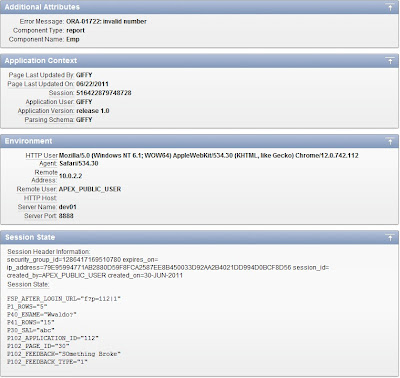
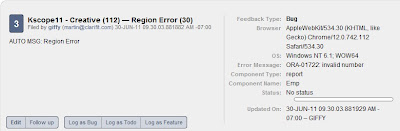 If you click the Edit button you can get a lot of detailed information about was happening when the user encountered the error including all of the values in session state.
In APEX Region Errors - Part 2 I discussed how to add triggers on the APEX Activity Log tables to store information in custom error tables when a user encounters an APEX region error.
Instead of storing the information in custom error tables you can leverage the APEX Feedback tool and trigger an automatic feedback entry. This may be a preferred option as you don't need to create custom tables and the feedback tool provides a lot of information.
Before continuing it's important that you know how to use the new APEX Feedback tool. If you don't know about the APEX Feedback tool I suggest that you read about how to create the feedback link (http://dgielis.blogspot.com/2010/03/apex-40-feedback-link.html) and how to access the feedback tool (http://dgielis.blogspot.com/2010/03/apex-40-looking-at-feedback-through.html). Try implementing it in a dummy application to see what you can do with it.
The following triggers will enter a feedback entry each time a region error occurs:
Disclaimer (again): Modifying anything in the APEX schema will put your APEX instance in an unsupported state. Please proceed with caution. I take no responsibility for any negative outcomes from this.
And... (differences are highlighted)
-- NOTE: Do this as the APEX_040000 user or a privlidged user such as SYSTEM
CREATE OR REPLACE TRIGGER apex_040000.trg_apex_activity_log1_air
  AFTER INSERT
  ON apex_040000.wwv_flow_activity_log1$
  FOR EACH ROW
  WHEN (new.SQLERRM IS NOT NULL)
DECLARE
BEGIN
  -- Log as feedback
  apex_util.submit_feedback (
    p_comment         => 'AUTO MSG: Region Error', -- Put a comment here that can be used to easily identify auto generated feedback messages
    p_type            => 3, -- Bug. See API documentation for different values
    p_application_id  => :new.flow_id,
    p_page_id         => :new.step_id,
    p_email           => null,
    p_label_01        => 'Error Message', -- You can add up to 8 label/attributes. See API documentation for more information
    p_attribute_01    => :new.sqlerrm,
    p_label_02        => 'Component Type',
    p_attribute_02    => :new.sqlerrm_component_type,
    p_label_03        => 'Component Name',
    p_attribute_03    => :new.sqlerrm_component_name
    );

   -- Could use APEX_MAIL to send a notification to a list of developers to take a look at problem
   -- This is entirely optional. Modify as required
   apex_mail.send(
    p_to => 'someone@yourorg.com',
    p_from => 'someone@yourorg.com',
    p_body => 'Region Error Occured. Please Check Feedback',
    p_body_html => '',
    p_subj => 'APEX Region Error');

END;
/
When a region error occurs you can now view the information in Team Development > Feedback.
-- NOTE: Do this as the APEX_040000 user or a privlidged user such as SYSTEM
CREATE OR REPLACE TRIGGER apex_040000.trg_apex_activity_log2_air
  AFTER INSERT
  ON apex_040000.wwv_flow_activity_log2$
  FOR EACH ROW
  WHEN (new.SQLERRM IS NOT NULL)
DECLARE
BEGIN
  -- Log as feedback
  apex_util.submit_feedback (
    p_comment         => 'AUTO MSG: Region Error', -- Put a comment here that can be used to easily identify auto generated feedback messages
    p_type            => 3, -- Bug. See API documentation for different values
    p_application_id  => :new.flow_id,
    p_page_id         => :new.step_id,
    p_email           => null,
    p_label_01        => 'Error Message', -- You can add up to 8 label/attributes. See API documentation for more information
    p_attribute_01    => :new.sqlerrm,
    p_label_02        => 'Component Type',
    p_attribute_02    => :new.sqlerrm_component_type,
    p_label_03        => 'Component Name',
    p_attribute_03    => :new.sqlerrm_component_name
    );

   -- Could use APEX_MAIL to send a notification to a list of developers to take a look at problem
   -- This is entirely optional. Modify as required
   apex_mail.send(
    p_to => 'someone@yourorg.com',
    p_from => 'someone@yourorg.com',
    p_body => 'Region Error Occured. Please Check Feedback',
    p_body_html => '',
    p_subj => 'APEX Region Error');

END;
/
 If you click the Edit button you can get a lot of detailed information about was happening when the user encountered the error including all of the values in session state.
Thursday, July 7, 2011
APEX 4 + HTML 5 = Awesome: Presentation Slides
You can download the slides of the APEX 4 + HTML 5 = Awesome presentation that I gave last week at ODTUG Kscope 11 from the following link: http://goo.gl/vWW3Z Please note that the slides have been modified for handout purposes (i.e. not the exact same that I showed in the presentation).
The slides should also be updated soon on the ODTUG Kscope Scheduler: http://caat.odtug.com/ODTUG_registration_menu.html
I'll post the How to be Creative II slides in the next few days.
The slides should also be updated soon on the ODTUG Kscope Scheduler: http://caat.odtug.com/ODTUG_registration_menu.html
I'll post the How to be Creative II slides in the next few days.

Wednesday, July 6, 2011
ODTUG KScope 11 - Recap
I had an amazing time in Long Beach CA last week for ODTUG Kscope 11. This was my fourth time attending the Kscope conference and I must say that the ODTUG committee, along with YCC, made it the best one yet!
Saturday
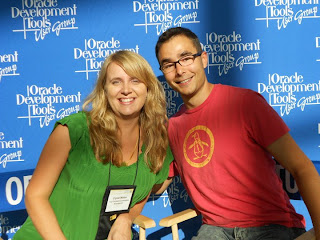
It all started for me on Saturday. Once I arrived in Long Beach I went to register right away. Along with registration (which went flawlessly thanks to Lauren) I had my picture taken with Crystal in the new social media lounge. Lori, from YCC, did an excellent job promoting social media at Kscope 11 and I think it was a huge success.
 Sunday
Sunday was the symposium day. Not surprisingly I attended the APEX track which were presentations given by the Oracle APEX team on the upcoming 4.1 features in APEX. Mike Hichwa gave us a glimpse of some of the long term plans for APEX. There's some really cool things coming up that he discussed including an APEX App Store.
After all the presentations were done we had the Welcome Reception in the Grand Ballroom. It was really nice to catch up with everyone and meet a lot of new people.
 Monday
Following the Welcome Keynote, the individual sessions started on Monday. It was really tough to chose which talk to go to. So many times throughout the conference I wanted to be in two or three places at the same time.
I really enjoyed Dimitri Gielis's presentation on APEX charts. He also mentioned that we may* (in the future) be able to have HTML 5 charts instead of flash charts. This would be very good for applications that run on iOS devices.
On Monday there was the APEX Open Mic night. This is something I was really looking forward to because you get to see a lot of live demos of APEX being used in organizations. Wayne Linton, a fellow Calgarian, kicked things off with a demo of his APEX application for managing roles in the database.
 Following the Open Mic night James and Tom from RedGate took some of us out to dinner at Parker's Lighthouse. Great food and good times with those that were there.
Tuesday
Tuesday morning I hid away in my hotel room as I was doing some last minute prep and practice for my presentation. I gave my first talk, APEX 4 + HTML 5 = Awesome, right before lunch to a packed room. It went really well and was a lot of fun.
In the afternoon I went to Roel Hartman's XFiles presentation. It is a cool application for storing and managing files in the database using XML DB. You can even download the application on SourceForge: http://sourceforge.net/projects/xace/
The final session of the night that I attended was Dimitri's APEX in Big Projects with Many Developers. Dimitri showed how he, and the team at APEX Evangelists, develop their applications. It was really interesting to see the list of tools they use and why they use them. It also encouraged me to start tracking time I spend on non-billable items such as writing blog posts, plugins, and answering questions.
Following the presentation everyone went to the Grand Ballroom for Happy Hour where we had some drinks and appetizers.
In the evening I attended the Oracle ACE dinner put on by Lillian Buziak. It was my first ACE dinner and I was very excited to be there and meet some of the other ACEs. After dinner I had a drink with some of the usual suspects (you know who you are) at the hotel bar and then headed off to bed.

Wednesday
After Tuesday's long day and great dinner it was tough to get up on Wednesday morning, but I schleped through it. The first presentation that I attended was by John Scott on APEX 4 plug-ins. The room was packed and, as usual, John did an excellent job highlighting how plugins work and showed off a few that he built. It was really cool to see that John integrated one of the HTML 5 items that I had demoed in Tuesday's presentation into one of his plug-ins.
After the morning sessions I took the rest of the afternoon off to deal with a critical client request and catch up on some rest (I didn't get a lot of sleep over the past few days so it eventually caught up to me).
Wednesday night was the big social event aboard the Queen Mary. The ODTUG committee went all out; it was SPECTACULAR. There was food everywhere, open bar (I was on best behavior since I had to present the next morning), jazz band, dueling piano, poker room, boat tours, and a cover band on the deck. The evening finished with some fireworks. I don't know how they're going to be able to top this event next year but I'm sure they'll find a way :-).
 Thursday
Those that woke up on Thursday morning were pretty tired from the long week and the previous night's soiree. I gave my second presentation, called How to be Creative II, at 8:30 AM. A lot of people shockingly showed up and things actually went really well given that everyone was a bit groggy. I threw in a few extra jokes to help keep the audience awake. Dan McGhan was also giving a talk on Dynamic Actions at the same time. Unfortunately I wasn't able to attend (since I was presenting) but I heard it went really well.
I attended part of Raj Mattamal's presentation on Collections. Raj is a very "dynamic" speaker and always puts on an interesting talk. I also caught part of Shakeeb Rahman's talk where he converted an APEX application to mimic Apple's home page (he called it iToons). It was Shakeeb's first solo talk and he did an excellent job.
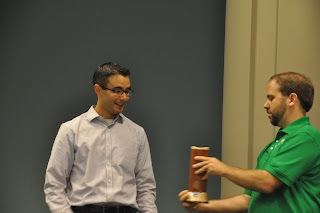
I also had a bit of a surprise on Thursday. At the closing ceremony I won the Best Speaker award for the APEX track and the overall Best Speaker of the Year award! I'm very honored to win the awards.
Summary
For those of you who didn't get to attend you really missed out on a stellar conference. The good news is that you can already register for Kscope 12 at www.kscope12.com which is going to be in San Antonio, Texas. Hope to see everyone there.
- Martin
Saturday
It all started for me on Saturday. Once I arrived in Long Beach I went to register right away. Along with registration (which went flawlessly thanks to Lauren) I had my picture taken with Crystal in the new social media lounge. Lori, from YCC, did an excellent job promoting social media at Kscope 11 and I think it was a huge success.
 Sunday
Sunday was the symposium day. Not surprisingly I attended the APEX track which were presentations given by the Oracle APEX team on the upcoming 4.1 features in APEX. Mike Hichwa gave us a glimpse of some of the long term plans for APEX. There's some really cool things coming up that he discussed including an APEX App Store.
After all the presentations were done we had the Welcome Reception in the Grand Ballroom. It was really nice to catch up with everyone and meet a lot of new people.
 Monday
Following the Welcome Keynote, the individual sessions started on Monday. It was really tough to chose which talk to go to. So many times throughout the conference I wanted to be in two or three places at the same time.
I really enjoyed Dimitri Gielis's presentation on APEX charts. He also mentioned that we may* (in the future) be able to have HTML 5 charts instead of flash charts. This would be very good for applications that run on iOS devices.
On Monday there was the APEX Open Mic night. This is something I was really looking forward to because you get to see a lot of live demos of APEX being used in organizations. Wayne Linton, a fellow Calgarian, kicked things off with a demo of his APEX application for managing roles in the database.
 Following the Open Mic night James and Tom from RedGate took some of us out to dinner at Parker's Lighthouse. Great food and good times with those that were there.
Tuesday
Tuesday morning I hid away in my hotel room as I was doing some last minute prep and practice for my presentation. I gave my first talk, APEX 4 + HTML 5 = Awesome, right before lunch to a packed room. It went really well and was a lot of fun.
In the afternoon I went to Roel Hartman's XFiles presentation. It is a cool application for storing and managing files in the database using XML DB. You can even download the application on SourceForge: http://sourceforge.net/projects/xace/
The final session of the night that I attended was Dimitri's APEX in Big Projects with Many Developers. Dimitri showed how he, and the team at APEX Evangelists, develop their applications. It was really interesting to see the list of tools they use and why they use them. It also encouraged me to start tracking time I spend on non-billable items such as writing blog posts, plugins, and answering questions.
Following the presentation everyone went to the Grand Ballroom for Happy Hour where we had some drinks and appetizers.
In the evening I attended the Oracle ACE dinner put on by Lillian Buziak. It was my first ACE dinner and I was very excited to be there and meet some of the other ACEs. After dinner I had a drink with some of the usual suspects (you know who you are) at the hotel bar and then headed off to bed.

Wednesday
After Tuesday's long day and great dinner it was tough to get up on Wednesday morning, but I schleped through it. The first presentation that I attended was by John Scott on APEX 4 plug-ins. The room was packed and, as usual, John did an excellent job highlighting how plugins work and showed off a few that he built. It was really cool to see that John integrated one of the HTML 5 items that I had demoed in Tuesday's presentation into one of his plug-ins.
After the morning sessions I took the rest of the afternoon off to deal with a critical client request and catch up on some rest (I didn't get a lot of sleep over the past few days so it eventually caught up to me).
Wednesday night was the big social event aboard the Queen Mary. The ODTUG committee went all out; it was SPECTACULAR. There was food everywhere, open bar (I was on best behavior since I had to present the next morning), jazz band, dueling piano, poker room, boat tours, and a cover band on the deck. The evening finished with some fireworks. I don't know how they're going to be able to top this event next year but I'm sure they'll find a way :-).
 Thursday
Those that woke up on Thursday morning were pretty tired from the long week and the previous night's soiree. I gave my second presentation, called How to be Creative II, at 8:30 AM. A lot of people shockingly showed up and things actually went really well given that everyone was a bit groggy. I threw in a few extra jokes to help keep the audience awake. Dan McGhan was also giving a talk on Dynamic Actions at the same time. Unfortunately I wasn't able to attend (since I was presenting) but I heard it went really well.
I attended part of Raj Mattamal's presentation on Collections. Raj is a very "dynamic" speaker and always puts on an interesting talk. I also caught part of Shakeeb Rahman's talk where he converted an APEX application to mimic Apple's home page (he called it iToons). It was Shakeeb's first solo talk and he did an excellent job.
I also had a bit of a surprise on Thursday. At the closing ceremony I won the Best Speaker award for the APEX track and the overall Best Speaker of the Year award! I'm very honored to win the awards.

Summary
For those of you who didn't get to attend you really missed out on a stellar conference. The good news is that you can already register for Kscope 12 at www.kscope12.com which is going to be in San Antonio, Texas. Hope to see everyone there.
- Martin
Thursday, June 23, 2011
ODTUG Kscope 11

I'll be speaking at ODTUG Kscope 11 next week in Long Beach, California. I've attended this conference for the past three years and it's always been an amazing time. Some of the world's best Oracle and APEX developers will be there. One of the best things I found is that everyone is extremely friendly and very approachable.
Here are the talks that I'm giving this year:
APEX 4 + HTML 5 = Awesome
Tuesday June 28, 11:15 AM-12:15 PM, Room: 202C
HTML 5 consists of many new features which will make developers’ jobs a lot easier and improve end-user experience. HTML 5 is currently under development but many browsers already support some of its features. APEX developers should be aware of these enhancements. This presentation will highlight some of the HTML 5 features and how to integrate them with your APEX application to produce stunning results.
How to Be Creative II
Thursday June 30, 8:30 AM-9:30 AM, Room: 202B
This presentation will demonstrate how to leverage the APEX dictionary, along with existing plug-ins, to enhance your APEX applications. It will include how to automate monitoring of your application, improve testing capabilities, improve development time, and provide some tweaks to enhance end-user experience.
If things work out I'll be giving away copies of the two books I co-authored (Beginning Oracle
Application Express 4 and Expert Oracle Application Express) at each of my presentations (if this sounds like a bribe it is, especially for the Thursday morning presentation following the Wednesday night party :-). Hope to see you there!
Monday, June 13, 2011
Beginning Oracle Application Express 4 - Author Podcast
I recently recorded a podcast, along with some of the other authors, about writing Beginning Oracle Application Express 4. Here's some more information about the podcast:
A conversation with Patrick Cimolini, Martin D'Souza, and Doug Gault; Authors of Beginning Application Express 4.
David Peake, Principal Product Manager for APEX, chats with some of the authors of Beginning Application Express 4. They will discuss various aspects about the book including the main reason for the book, who the book is focused towards, and some behind the scene information about writing the book.
A conversation with Patrick Cimolini, Martin D'Souza, and Doug Gault; Authors of Beginning Application Express 4.
David Peake, Principal Product Manager for APEX, chats with some of the authors of Beginning Application Express 4. They will discuss various aspects about the book including the main reason for the book, who the book is focused towards, and some behind the scene information about writing the book.
Wednesday, June 8, 2011
Highlight Words in Standard Reports
After creating a plugin I received a lot of questions about how to enable column highlighting as shown in the following screen shot:
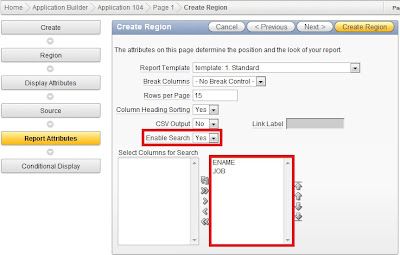
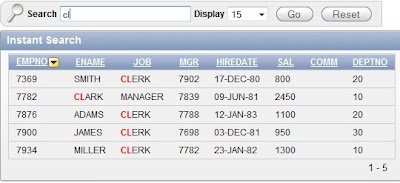 Column highlighting is not part of the plug-in. It is a built-in feature in APEX that has been around for a very long time. They're two ways to enable column highlighting in standard reports. The first is through the create report wizard. When you enable searching, as shown below, the columns that are selected to be searchable will automatically have column highlighting enabled on then.
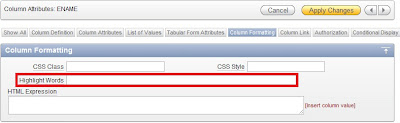
 To manually highlight a column edit the column. Scroll down to the Column Formatting region shown below. In the Highlight Words field you can enter a comma delimited list of words to search for or reference APEX items using the &ITEM_NAME. syntax. Note: for more on APEX variable syntax read this post.
 Column highlighting is not part of the plug-in. It is a built-in feature in APEX that has been around for a very long time. They're two ways to enable column highlighting in standard reports. The first is through the create report wizard. When you enable searching, as shown below, the columns that are selected to be searchable will automatically have column highlighting enabled on then.
 To manually highlight a column edit the column. Scroll down to the Column Formatting region shown below. In the Highlight Words field you can enter a comma delimited list of words to search for or reference APEX items using the &ITEM_NAME. syntax. Note: for more on APEX variable syntax read this post.
Wednesday, April 13, 2011
Malicious Code in APEX Plugins - Feedback
My previous post about Malicious Code in APEX Plugins identified the possibility of harmful code in plugins (if you haven't read it please read the post before continuing). Several people had some excellent feedback which they included in the comments section. This post summarizes their comments and provides my thoughts on them.
Oracle Maintaining Plugin Repository
The idea is for Oracle to host something similar to Apple's App Store so that all code must pass a set of standards etc. I don't work for Oracle so I can't comment on this too much and I think it's a good idea. That being said the current community plugin repository, apex-plugin.com, has an approval process before plugins are released.
Wrapped PL/SQL and Licensed Plugins
Some plugins have wrapped PL/SQL source code and obfuscated/minimized JavaScript (JS) code. Plugin developers may need to wrap their PL/SQL code since their plugins are licensed. They may also minimize their JS files for performance issues. When you use these plugins the company that developed it can help determine its legitimacy (more on this in the next section). Just because it's wrapped doesn't mean you should not install it. They're other ways to validate that it is safe to use.
Trusted Developers and Organizations
They're some companies and developers within the APEX community that are well known and trusted. These companies specialize in APEX and would never write malicious code. For example I would never hesitate to install a plugin from organizations such as (but not limited to) ClariFit, Apex Evangelists, APEX Freelancer, Skill Builders, and Sumneva.
Scalability and Upgrades
Scott Spendolini made a great comment about the scalability of plugins and upgrades. I think this has to be examined on a case by case basis. If you're using a plugin on a small application that doesn't get a lot of hits then it may be a moot point. If your application gets millions of hits a day and you use a poorly optimized plugin then maybe you need to modify it to fit your needs. When looking at the source code you may not only be looking for malicious code but also techniques to improve performance for your specific needs. If the plugin has wrapped PL/SQL you can try to contact the developer/company to address your specific needs.
Like all software, plugins may need to be upgraded as APEX evolves (and it's 3rd party add-ons like jQuery). If the plugin is open source you can easily modify the code or email the developer with a change request. I've had several people email me about bugs and feature enhancements for plugins and was able to implement them in future versions.
Oracle Maintaining Plugin Repository
The idea is for Oracle to host something similar to Apple's App Store so that all code must pass a set of standards etc. I don't work for Oracle so I can't comment on this too much and I think it's a good idea. That being said the current community plugin repository, apex-plugin.com, has an approval process before plugins are released.
Wrapped PL/SQL and Licensed Plugins
Some plugins have wrapped PL/SQL source code and obfuscated/minimized JavaScript (JS) code. Plugin developers may need to wrap their PL/SQL code since their plugins are licensed. They may also minimize their JS files for performance issues. When you use these plugins the company that developed it can help determine its legitimacy (more on this in the next section). Just because it's wrapped doesn't mean you should not install it. They're other ways to validate that it is safe to use.
Trusted Developers and Organizations
They're some companies and developers within the APEX community that are well known and trusted. These companies specialize in APEX and would never write malicious code. For example I would never hesitate to install a plugin from organizations such as (but not limited to) ClariFit, Apex Evangelists, APEX Freelancer, Skill Builders, and Sumneva.
Scalability and Upgrades
Scott Spendolini made a great comment about the scalability of plugins and upgrades. I think this has to be examined on a case by case basis. If you're using a plugin on a small application that doesn't get a lot of hits then it may be a moot point. If your application gets millions of hits a day and you use a poorly optimized plugin then maybe you need to modify it to fit your needs. When looking at the source code you may not only be looking for malicious code but also techniques to improve performance for your specific needs. If the plugin has wrapped PL/SQL you can try to contact the developer/company to address your specific needs.
Like all software, plugins may need to be upgraded as APEX evolves (and it's 3rd party add-ons like jQuery). If the plugin is open source you can easily modify the code or email the developer with a change request. I've had several people email me about bugs and feature enhancements for plugins and was able to implement them in future versions.
Wednesday, April 6, 2011
Malicious Code in APEX Plugins
The following post could be taken in the wrong way which may discourage some people from using plugins developed by the APEX community. Please read the ENTIRE post before you make any conclusions.
They're some good comments for this post. I've summarized them and included my thoughts in the following post: Malicious Code in APEX Plugins - Feedback
One of the best features of APEX plugins is the ability to share them with the community. Some sites, such as apex-plugin.com, host over 70 plugins. Most of these plugins are open source and free to use in production applications. These plugins have saved organizations lots of time developing redundant code.
There is the possibility for someone to develop a malicious plugin which could compromise your entire database or access to your application. For example I could easily create a dynamic action plugin that could send me a list of all your tables each time the plug-in is run. That being said I would never do that, but someone with bad intentions could.
What does this mean for you? Before integrating a plugin into your application (even in a development environment) you should look at both the PL/SQL and JavaScript code to see what they do. In most cases this extra step will take a few minutes but can save you a lot of headaches (and potentially your job). This is one of the main reasons why I don't compress JavaScript files in plugins that I post on apex-plugin.com. I want to ensure that other developers can easily review my code.
I am not trying to fear monger (there's enough of that going on in society as is) developers about the threat of using plugins. I just want to make sure that developers know the risks involved and what they should do to protect their database and business when integrating 3rd party plugins.
They're some good comments for this post. I've summarized them and included my thoughts in the following post: Malicious Code in APEX Plugins - Feedback
One of the best features of APEX plugins is the ability to share them with the community. Some sites, such as apex-plugin.com, host over 70 plugins. Most of these plugins are open source and free to use in production applications. These plugins have saved organizations lots of time developing redundant code.
There is the possibility for someone to develop a malicious plugin which could compromise your entire database or access to your application. For example I could easily create a dynamic action plugin that could send me a list of all your tables each time the plug-in is run. That being said I would never do that, but someone with bad intentions could.
What does this mean for you? Before integrating a plugin into your application (even in a development environment) you should look at both the PL/SQL and JavaScript code to see what they do. In most cases this extra step will take a few minutes but can save you a lot of headaches (and potentially your job). This is one of the main reasons why I don't compress JavaScript files in plugins that I post on apex-plugin.com. I want to ensure that other developers can easily review my code.
I am not trying to fear monger (there's enough of that going on in society as is) developers about the threat of using plugins. I just want to make sure that developers know the risks involved and what they should do to protect their database and business when integrating 3rd party plugins.
Thursday, March 31, 2011
My First Book: Beginning Oracle Application Express 4
I'm pleased to announce that Beginning Oracle Application Express 4 is finally published! I co-authored this book along with Doug Gault, Karen Cannell, Patrick Cimolini, and Timothy St. Hilaire. Co-authoring this book was a very interesting experience which was well worth the time and effort.
This book is aimed at beginner to intermediate APEX developers. It contains a lot of step by step instructions and detailed explanations to help you get a solid foundation for APEX development. You can purchase it from Amazon.com. If you'd prefer a soft copy the publisher, Apress, also offers the eBook.
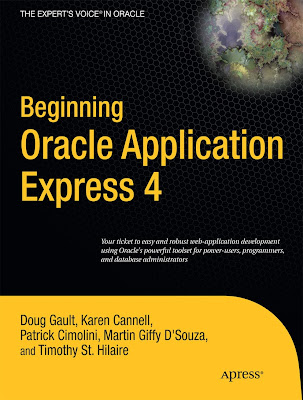
Table of contents
Part I: Introducing APEX
Chapter 1: An Introduction to APEX 4.0
Chapter 2 - APEX 4.0: A Developer's Overview
Part II: Beginning APEX 4.0 Programming
Chapter 3 - Identifying the Problem & Designing the Solution
Chapter 4 - SQL Workshop
Chapter 5 - Creating the Base Application & Navigational Components
Chapter 6 - Forms & Reports
Chapter 7 - Charts & Maps
Chapter 8- Programmatic Elements
Chapter 9 - Security
Chapter 10 - Deploying Applications
Part III: Programming Websheets
Chapter 11 - Understanding Websheets
Chapter 12 - A WebSheets Example
Part IV: Advanced Topics
Chapter 13 - Extended Developer Tools
Chapter 14 - Managing Workspaces
Chapter 15 - Team Development
This book is aimed at beginner to intermediate APEX developers. It contains a lot of step by step instructions and detailed explanations to help you get a solid foundation for APEX development. You can purchase it from Amazon.com. If you'd prefer a soft copy the publisher, Apress, also offers the eBook.

Table of contents
Part I: Introducing APEX
Chapter 1: An Introduction to APEX 4.0
Chapter 2 - APEX 4.0: A Developer's Overview
Part II: Beginning APEX 4.0 Programming
Chapter 3 - Identifying the Problem & Designing the Solution
Chapter 4 - SQL Workshop
Chapter 5 - Creating the Base Application & Navigational Components
Chapter 6 - Forms & Reports
Chapter 7 - Charts & Maps
Chapter 8- Programmatic Elements
Chapter 9 - Security
Chapter 10 - Deploying Applications
Part III: Programming Websheets
Chapter 11 - Understanding Websheets
Chapter 12 - A WebSheets Example
Part IV: Advanced Topics
Chapter 13 - Extended Developer Tools
Chapter 14 - Managing Workspaces
Chapter 15 - Team Development
Tuesday, February 1, 2011
demo.talkapex.com
As part of this blog I've posted a lot of demos on apex.oracle.com. One thing that's always bothered me is that the demos have never been linked together or searchable.
I finally create a new demo site: demo.talkapex.com. Going forward all demos will be hosted on this site. In some cases I may move the old demos to the new site.
I finally create a new demo site: demo.talkapex.com. Going forward all demos will be hosted on this site. In some cases I may move the old demos to the new site.
Wednesday, January 5, 2011
Variables in APEX
When I first started using APEX I was unsure about which method to use when referencing variables (values in session state). The purpose of this post is to outline the different ways to reference APEX variables and provide an examples for each case.
They're five ways to reference variables in APEX:
Bind variables can be used in any block of SQL or PL/SQL code inside APEX. For example if creating a report to display all the employees in a selected department the query would be:
Substitution Strings
Substitution strings use the &variable. notation. They can be used anywhere in your APEX application such as a HTML region or even a template. You can also use them in inline SQL and PL/SQL code but it is not recommended for security reasons. For more information on this security risk read the following Oracle white paper on SQL Injection
A simple example of using a substitution string is in a HTML region which displays a welcome message. The region source would be:
If you want to reference APEX variables in compiled code, such as views, packages, and procedures, you can't use bind variables. The easiest way to reference the variables is to use the V (for strings) and NV (for numbers) functions. For example:
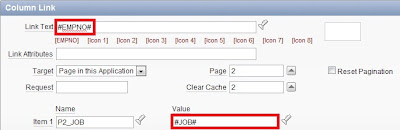
The hash notation of #variable# is used in multiple places. When creating column links in a report you can use the hash notation to represent column values. The following figure highlights how column values are referenced in a report link. #EMPNO# is used to reference the EMPNO column and #JOB# is used to pass the job as a parameter to Page 2.
The hash notation is also used in templates (Shared Components > Templates). When modifying a template they're special variables available depending on the type of template. These variables can be found at the bottom of the screen in the Substitution Strings section.
Shortcuts
Shortcuts can only be used in specific areas within APEX (such as some regions, labels, and templates) and can be rendered both statically or dynamically (using PL/SQL functions). To reference a Shortcut use the "shortcutname" notation (quotes included). The following article covers Shortcuts in more detail, including where you can use them in APEX: http://www.talkapex.com/2014/02/apex-shortcuts.html
For more information about referencing variables in APEX read the Referencing Session State section in the builder guide.
They're five ways to reference variables in APEX:
- :Bind_variables
- &Substitution_strings.
- V / NV functions
- #Hash#
- "Shortcuts"
Bind variables can be used in any block of SQL or PL/SQL code inside APEX. For example if creating a report to display all the employees in a selected department the query would be:
SELECT ename
  FROM emp
 WHERE deptno = :p1_deptno
Where P1_DEPTNO is a page item that you created.
Substitution Strings
Substitution strings use the &variable. notation. They can be used anywhere in your APEX application such as a HTML region or even a template. You can also use them in inline SQL and PL/SQL code but it is not recommended for security reasons. For more information on this security risk read the following Oracle white paper on SQL Injection
A simple example of using a substitution string is in a HTML region which displays a welcome message. The region source would be:
Hello &APP_USER.

Welcome to the demo application.
V / NV Functions
If you want to reference APEX variables in compiled code, such as views, packages, and procedures, you can't use bind variables. The easiest way to reference the variables is to use the V (for strings) and NV (for numbers) functions. For example:
CREATE OR REPLACE PROCEDURE log_apex_info
AS
BEGIN
  INSERT INTO tapex_log ( username, apex_page_id, access_date)
       VALUES (V ('APP_USER'), NV ('APP_PAGE_ID'), SYSDATE);
END;
#Hash#The hash notation of #variable# is used in multiple places. When creating column links in a report you can use the hash notation to represent column values. The following figure highlights how column values are referenced in a report link. #EMPNO# is used to reference the EMPNO column and #JOB# is used to pass the job as a parameter to Page 2.

The hash notation is also used in templates (Shared Components > Templates). When modifying a template they're special variables available depending on the type of template. These variables can be found at the bottom of the screen in the Substitution Strings section.
Shortcuts
Shortcuts can only be used in specific areas within APEX (such as some regions, labels, and templates) and can be rendered both statically or dynamically (using PL/SQL functions). To reference a Shortcut use the "shortcutname" notation (quotes included). The following article covers Shortcuts in more detail, including where you can use them in APEX: http://www.talkapex.com/2014/02/apex-shortcuts.html
For more information about referencing variables in APEX read the Referencing Session State section in the builder guide.
Tuesday, January 4, 2011
Missing ID in the No Template Region Template
When you create or edit a region in APEX you can select a template. Region templates define the location of buttons in a region, how the region looks, etc. There is a region template called "No Template" which is the first option in the template list. When you select No Template as the region template APEX will only display the content of the region an nothing else (no header, buttons, etc).
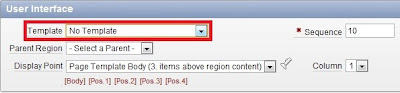
There is a problem with using No Template if you use Dynamic Actions or have any JavaScript code which references the region. The No Template region template does not contain an ID attribute which prevents dynamic actions from binding to the region.
The following steps will create a region that simulates the "No Template" region and includes an ID so it will work with dynamic actions.
- Go to Shared Components
- Click on Templates
- Click the Create button
- Template Type: Region
- Select From Scratch and click Next
- Name: No Template w. ID
Theme: Select your default theme (in most cases you'll only have one option)
Template Class: Reports Region
Click the Create button
- You should be brought back to the Templates page. To filter the list of regions select Region as the Type and click the Go button
- Click on No Template w. ID to modify it
- Put the following HTML in the Definition section
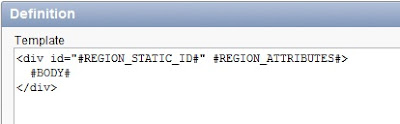 - Click the Apply Changes button
If you modify your region that used No Template and change it to the new template that you created, No Template w. ID, it will look the same for the end users with the big difference being that dynamic actions will work when applied against the region.
The following query identifies regions that use the No Template region template which you may want to modify to use the custom No Template w. ID:

There is a problem with using No Template if you use Dynamic Actions or have any JavaScript code which references the region. The No Template region template does not contain an ID attribute which prevents dynamic actions from binding to the region.
The following steps will create a region that simulates the "No Template" region and includes an ID so it will work with dynamic actions.
- Go to Shared Components
- Click on Templates
- Click the Create button
- Template Type: Region
- Select From Scratch and click Next
- Name: No Template w. ID
Theme: Select your default theme (in most cases you'll only have one option)
Template Class: Reports Region
Click the Create button
- You should be brought back to the Templates page. To filter the list of regions select Region as the Type and click the Go button
- Click on No Template w. ID to modify it
- Put the following HTML in the Definition section
- It should look like
#BODY#
 - Click the Apply Changes button
If you modify your region that used No Template and change it to the new template that you created, No Template w. ID, it will look the same for the end users with the big difference being that dynamic actions will work when applied against the region.
The following query identifies regions that use the No Template region template which you may want to modify to use the custom No Template w. ID:
Note: I think Patrick Wolf mentioned that the No Template region template will include an ID in APEX 4.1.
SELECT page_id, page_name, region_name, template
  FROM apex_application_page_regions
 WHERE application_id = :app_id
   AND template = 'No Template'
Monday, December 13, 2010
Column Groups in APEX 4.0 Interactive Reports
A long time ago I wrote about adding Column Groups to Interactive Reports (IR) in APEX: http://www.talkapex.com/2009/03/column-groups-in-apex-interactive.html I created a new dynamic action plugin to do column grouping in APEX which can be downloaded here. Please read the help text in the plugin for full instructions on how to use it. Once integrated it should look like:

I also added additional JS debugging information. If you run your application in debug mode and look at the console you'll notice the following log information:

The additional logging is using the console logger wrapper that wrote: http://www.talkapex.com/2010/08/javascript-console-logger.html If you're writing your own plugins I suggest using it to instrument your code. It helped me debug some of my JavaScript issues while developing this plugin.

I also added additional JS debugging information. If you run your application in debug mode and look at the console you'll notice the following log information:

The additional logging is using the console logger wrapper that wrote: http://www.talkapex.com/2010/08/javascript-console-logger.html If you're writing your own plugins I suggest using it to instrument your code. It helped me debug some of my JavaScript issues while developing this plugin.
Wednesday, December 8, 2010
APEX 4.0: New Columns in APEX_WORKSPACE_ACTIVITY_LOG
Over a year ago I wrote about how to permanently store some of the log information from APEX: http://www.talkapex.com/2009/05/apex-logs-storing-log-data.html APEX 4.0 has some additional columns in APEX_WORKSPACE_ACTIVITY_LOG which you may want to store as well. The following query identifies the new columns:
Note: This query assumes you still have an old instance of APEX 3.2 and a new instance of APEX 4.0 on your database
CONTENT_LENGTH
INTERACTIVE_REPORT_ID
IR_SAVED_REPORT_ID
IR_SEARCH
WS_APPLICATION_ID
WS_DATAGRID_ID
WS_PAGE_ID
If you permanently store the log information you may want to update your tables and scripts to store the new information.
Note: This query assumes you still have an old instance of APEX 3.2 and a new instance of APEX 4.0 on your database
SELECT column_nameIn case you don't have an old 3.2 instance on your database the new columns are:
FROM all_tab_columns
WHERE owner = 'APEX_040000'
AND table_name = 'APEX_WORKSPACE_ACTIVITY_LOG'
MINUS
SELECT column_name
FROM all_tab_columns
WHERE owner = 'APEX_030200'
AND table_name = 'APEX_WORKSPACE_ACTIVITY_LOG'
ORDER BY column_name
CONTENT_LENGTH
INTERACTIVE_REPORT_ID
IR_SAVED_REPORT_ID
IR_SEARCH
WS_APPLICATION_ID
WS_DATAGRID_ID
WS_PAGE_ID
If you permanently store the log information you may want to update your tables and scripts to store the new information.
Tuesday, December 7, 2010
APEX: How to Trigger Dynamic Action From Button
Someone recently asked me how to trigger a dynamic action from a button. At first I thought this was trivial question until I tried to do it and found it's not as straight forward as I expected.
The following steps cover how to create a dynamic action on a button:
Modify Button Template:
You'll need to modify the button template to allow for the button attributes to be applied to the button. This will allow us to use an ID to identify a button. To apply the button attributes go to Shared Components > Templates > Select the default button template (for most instances called "Button"). Add #BUTTON_ATTRIBUTES# to the button tag in the Template section. For example from:
<button value="#LABEL#" onclick="#LINK#" class="button-gray" type="button">
To:
<button value="#LABEL#" onclick="#LINK#" class="button-gray" type="button" #BUTTON_ATTRIBUTES#>
Create Button
On the page you're working on create a Region Button:
Button Name: TEST BUTTON
Label: Test Button
Button Style: Template Based Button
Button Template: Button (or what ever button template you modified)
Button Attributes: id="test_button"
Make sure the id is unique
Action: Redirect to URL
URL Target: javascript:return;
Create Dynamic Action
Create a Dynamic Action. When you get to the "When" section:
Event: Click
Selection Type: DOM Object
DOM Object: test_button
The DOM object represents the ID that you defined while creating the button.
Condition: No Condition
Create your True and/or False actions accordingly.
Now when you run the page and click the button it should execute your dynamic action.
The following steps cover how to create a dynamic action on a button:
Modify Button Template:
You'll need to modify the button template to allow for the button attributes to be applied to the button. This will allow us to use an ID to identify a button. To apply the button attributes go to Shared Components > Templates > Select the default button template (for most instances called "Button"). Add #BUTTON_ATTRIBUTES# to the button tag in the Template section. For example from:
<button value="#LABEL#" onclick="#LINK#" class="button-gray" type="button">
To:
<button value="#LABEL#" onclick="#LINK#" class="button-gray" type="button" #BUTTON_ATTRIBUTES#>
Create Button
On the page you're working on create a Region Button:
Button Name: TEST BUTTON
Label: Test Button
Button Style: Template Based Button
Button Template: Button (or what ever button template you modified)
Button Attributes: id="test_button"
Make sure the id is unique
Action: Redirect to URL
URL Target: javascript:return;
Create Dynamic Action
Create a Dynamic Action. When you get to the "When" section:
Event: Click
Selection Type: DOM Object
DOM Object: test_button
The DOM object represents the ID that you defined while creating the button.
Condition: No Condition
Create your True and/or False actions accordingly.
Now when you run the page and click the button it should execute your dynamic action.
Monday, October 25, 2010
APEX Hash Tag on Twitter: #orclapex
The old Oracle APEX hash tag on twitter was #apex. If you search for #apex on Twitter you get a lot of non Oracle APEX related topics as apex is a common name.
Today I proposed a new hash tag for Oracle APEX related content on Twitter. Thanks to Scott Spendolini for coming up with the final name and Dan McGhan for providing feedback.
When posting on Oracle APEX related content on Twitter please us #orclapex
Today I proposed a new hash tag for Oracle APEX related content on Twitter. Thanks to Scott Spendolini for coming up with the final name and Dan McGhan for providing feedback.
When posting on Oracle APEX related content on Twitter please us #orclapex
Thursday, October 21, 2010
APEX Reports: No Limit Downloads
When configuring a standard report in APEX you can define the maximum number of rows that the query will return. This setting is called Max Row Count and can be configured in the Report Attributes tab. If you leave it blank it will default to 500 rows.

It is recommended that you set the Max Row Count with a low value. Using a small number will help improve performance since it reduces the amount rows APEX must count in order to display the pagination information. On a business perspective, it may not make sense to return thousands of rows for a user to view online.
What if the user wants to retrieve all the data when they download the report? From the end users perspective this makes sense since they may want to extract all the data to do some custom analysis.
My first thought was to use a page item for the Maximum Row Count. I quickly discovered that it only takes a numeric value. As a work around you can control the rows returned directly from the SQL statement. Here's an example of this:
- Create a large table:
Create a standard report using the following query. Set the Max Row Count to 999999999 (i.e. some very large number)
When users views the report in APEX it will only display a maximum of 500 rows. When they download the report the csv file will contain all the rows.
A caveat with this approach is that if your report has more than 500 rows you won't see the "... of more than 500" rows message as part of the pagination. Instead users will see "rows ... of 500" in the pagination. Users may be misled to think that the report only has 500 rows of data.
When I reviewed this technique I was concerned about performance issues when viewing the report in APEX. Here are the TKPROF outputs of the original query (with Max Row Count = 500) and the alternate query with the ROWNUM predicate (Max Row Count = 999999999):

It is recommended that you set the Max Row Count with a low value. Using a small number will help improve performance since it reduces the amount rows APEX must count in order to display the pagination information. On a business perspective, it may not make sense to return thousands of rows for a user to view online.
What if the user wants to retrieve all the data when they download the report? From the end users perspective this makes sense since they may want to extract all the data to do some custom analysis.
My first thought was to use a page item for the Maximum Row Count. I quickly discovered that it only takes a numeric value. As a work around you can control the rows returned directly from the SQL statement. Here's an example of this:
- Create a large table:
- Create standard report
CREATE TABLE large_emp
AS
      SELECT *
        FROM emp
  CONNECT BY LEVEL <= 5;
Create a standard report using the following query. Set the Max Row Count to 999999999 (i.e. some very large number)
You are manually defining the Max Row Count by adding in ROWNUM predicate.
SELECT ename,
       job,
       sal,
       comm
  FROM large_emp
 WHERE ROWNUM <= CASE WHEN :request LIKE ('FLOW_EXCEL_OUTPUT%') THEN ROWNUM ELSE 500 END;
When users views the report in APEX it will only display a maximum of 500 rows. When they download the report the csv file will contain all the rows.
A caveat with this approach is that if your report has more than 500 rows you won't see the "... of more than 500" rows message as part of the pagination. Instead users will see "rows ... of 500" in the pagination. Users may be misled to think that the report only has 500 rows of data.
When I reviewed this technique I was concerned about performance issues when viewing the report in APEX. Here are the TKPROF outputs of the original query (with Max Row Count = 500) and the alternate query with the ROWNUM predicate (Max Row Count = 999999999):
I'm not a performance guru and I can't comment too much on these outputs. If you think this will have negative effects on performance please add your feedback as a comment on this post.
-- Both outputs are for VIEWING the report (not downloading it)
--
-- Original Query
-- Max Row Count = 500
-- Run for displaying rows 1~15
SELECT ename, job, sal, comm
  FROM large_emp
 order by 3 -- Automatically added by APEX

call     count       cpu    elapsed       disk      query    current        rows
------- ------  -------- ---------- ---------- ---------- ----------  ----------
Parse        1      0.00       0.00          0          1          0           0
Execute      2      0.00       0.00          0          0          0           0
Fetch      501      0.65       1.42         14       3417          3         501
------- ------  -------- ---------- ---------- ---------- ----------  ----------
total      504      0.65       1.42         14       3418          3         501

Misses in library cache during parse: 1
Optimizer mode: ALL_ROWS
Parsing user id: 40     (recursive depth: 2)

Rows     Row Source Operation
-------  ---------------------------------------------------
    501  SORT ORDER BY (cr=3417 pr=14 pw=2053 time=1417580 us)
 579194   TABLE ACCESS FULL LARGE_EMP (cr=3417 pr=0 pw=0 time=1158549 us)


Elapsed times include waiting on following events:
  Event waited on                             Times   Max. Wait  Total Waited
  ----------------------------------------   Waited  ----------  ------------
  direct path write temp                         70        0.00          0.00
  direct path read temp                           2        0.00          0.00


-- *************************************

-- New Query
-- Max Row Count = 9999999999
-- Run for displaying rows 1~15
SELECT ename, job, sal, comm
  FROM large_emp
 WHERE ROWNUM <= CASE WHEN :request LIKE ('FLOW_EXCEL_OUTPUT%') THEN ROWNUM ELSE 500 END
 order by 3 -- Automatically added by APEX

call     count       cpu    elapsed       disk      query    current        rows
------- ------  -------- ---------- ---------- ---------- ----------  ----------
Parse        2      0.00       0.00          0          0          0           0
Execute      2      0.00       0.00          0          0          1           0
Fetch      501      0.38       0.53          0       3417          0         500
------- ------  -------- ---------- ---------- ---------- ----------  ----------
total      505      0.38       0.54          0       3417          1         500

Misses in library cache during parse: 1
Parsing user id: 40     (recursive depth: 2)

Rows     Row Source Operation
-------  ---------------------------------------------------
    500  SORT ORDER BY (cr=3417 pr=0 pw=0 time=535125 us)
    500   COUNT  (cr=3417 pr=0 pw=0 time=3376 us)
    500    FILTER  (cr=3417 pr=0 pw=0 time=2298 us)
 579194     TABLE ACCESS FULL LARGE_EMP (cr=3417 pr=0 pw=0 time=5212959 us)
Wednesday, October 20, 2010
Oracle XE and APEX: Where is my Trace File?
In APEX you trace your session by adding &p_trace=YES at the end of your URL. For example: http://fcapex40:8080/apex/f?p=101:1:2603384364125271::NO&p_trace=YES Please refer to the APEX documentation for more information regarding traces in APEX.
The documentation states that the trace file is located in the following directory:
This isn't the case if you're using the Embedded PL/SQL Gateway, which is how APEX is run on Oracle XE. Thanks to Jari for answering my question on the APEX forum about this: http://forums.oracle.com/forums/thread.jspa?forumID=137&threadID=1771547
For APEX installations that use the PL/SQL Embedded Gateway (i.e. Oracle XE) the trace file is located in the following directory:
To find the trace file that was created for your session:
The documentation states that the trace file is located in the following directory:
SQL> -- Run as SYSTEM
SQL>  SHOW PARAMETERS user_dump_dest

NAME                                 TYPE        VALUE
------------------------------------ ----------- ------------------------------
user_dump_dest                       string      /usr/lib/oracle/xe/app/oracle/
                                                 admin/XE/udump
This isn't the case if you're using the Embedded PL/SQL Gateway, which is how APEX is run on Oracle XE. Thanks to Jari for answering my question on the APEX forum about this: http://forums.oracle.com/forums/thread.jspa?forumID=137&threadID=1771547
For APEX installations that use the PL/SQL Embedded Gateway (i.e. Oracle XE) the trace file is located in the following directory:
SQL> SHOW PARAMETER background_dump_dest

NAME                                 TYPE        VALUE
------------------------------------ ----------- ------------------------------
background_dump_dest                 string      /usr/lib/oracle/xe/app/oracle/
                                                 admin/XE/bdump
To find the trace file that was created for your session:
$ cd /usr/lib/oracle/xe/app/oracle/admin/XE/bdump
$ grep -l "APP_SESSION" *.trc
#example
$ grep -l "2603384364125271" *.trc
Subscribe to:
Posts (Atom)