Thursday, March 13, 2014

APEX 5.0 and KScope 14

A few weeks ago the Oracle APEX team released APEX 5.0 EA1 (Early Adopter). You can try the new version of APEX at ea.oracleapex.com.

I expect that the APEX team will release an EA2 and possible EA3 version before officially launching APEX 5.0 with the final release coming around June. Just to be clear, these are my personal estimates not any inside information.

Releasing APEX 5.0 in June would be perfect timing as it coincides with Kscope 14. The conference has a lot of talks specifically focused on APEX 5.0 from both the Oracle development team and some of the worlds leading experts on all things APEX. I think that this conference will be a great opportunity for people (both developers and managers) to learn about all the new features and get hands on experience with this latest version.

One of the unique aspects of Kscope is that you'll be able to easily talk to the Oracle APEX team, Oracle ACE and ACE Directors, and other experts in the community. These are the people that write the blogs, read the books, and do the webinars that you may have read/seen. You can sit down with them and get their advice on how to integrate 5.0 and leverage it to enhance your current applications and increase ROI.

I'll be giving a talk at Kscope 14 called "APEX 5.0 - New Features Highlights". It will cover some of the new aspects of APEX that will help both developers and the business. You can see all the Kscope 14 APEX abstracts here. If you're thinking of coming to the conference you should register soon as Early Bird rates end on March 25th.

Hope to see you at Kscope 14!

Wednesday, March 5, 2014

Referencing USER in APEX


It’s not uncommon to reference the current user as USER in your pl/sql code. A simple use case may be to determine the client or environment that you’re running in (ex: dev, test, prod).

Referencing USER will have some slight side effects when running the code in APEX as the current USER is actually APEX_PUBLIC_USER (or what ever user you configured). This can cause issues in your application. To resolve it, simply reference sys_context('userenv','current_schema’) instead.

Example:
-- Via SQL*Plus
select user, sys_context('userenv','current_schema')
from dual;

USER        SYS_CONTEXT('USERENV
---------- --------------------
GIFFY        GIFFY
If you run the same query in APEX the output is shown below. You'll notice that referencing USER it does not display my current schema (GIFFY in this case).
The same applies to compiled code executed from APEX. For example if you have a procedure that references USER and that procedure is run from APEX then USER will be APEX_PUBLIC_USER.

This can be really tough to detect in automated tests as when testing via SQL*Plus, USER will return the current schema name.

Tuesday, February 25, 2014

Oracle APEX Training

I'm pleased to announce that I'll be doing some online Oracle Application Express (APEX) training! After giving talks around the world, writing several books, and teaching at a local Institute of Technology I think it's only natural to expand into the online world.

The first course I'm teaching is called APEX Web Components covering CSS, JavaScript, and jQuery. The course go over each of the technologies and how to integrate and enhance your APEX applications.

This course will run from April 14th to April 16th from 12-4pm EDT each day. For more information and to register go to: http://clarifit-orclapexweb.eventbrite.com/?aff=talkapex As an added bonus as a reader of this blog use discount code TALKAPEX for an additional $100 off registration. 

If you'd like to keep informed of future classes please sign up for our email list.


Monday, February 24, 2014

APEX Shortcuts


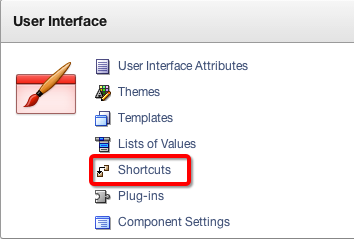
The other day I was dabbling around in APEX and noticed a link for Shortcuts in the Shared Components section.


I’ve never used Shortcuts before (let along knew about them) so I tried it out. To start here’s how Shortcuts are described (as copied from APEX screen):

Shortcuts are a repository of shared static or dynamic HTML. Shortcuts are substitution strings that are expanded using the syntax: "SHORTCUT_NAME". Shortcuts are used in the following locations:

  • Region Source for regions of type HTML_WITH_SHORTCUTS
  • Region Templates, Region Headers & Footers
  • Item Labels
  • Item Default Value
  • Item Post Element Text
  • Item Help Text
  • HTML Header of a page

Creating shortcuts on page item labels and page item post element text attributes can include the following substitution strings: 
#CURRENT_FORM_ELEMENT# 
#CURRENT_ITEM_ID# 
#CURRENT_ITEM_NAME# 
#CURRENT_ITEM_HELP_TEXT#

To reference Shortcuts you need to use the “shortcutname” syntax (quotes included). Since they are wrapped in quotes and could conflict with regular text I strong recommend using a naming scheme such as SC_NAME.

Note: I previously wrote an article about the different ways to reference APEX variables. I have updated it to include Shortcuts. The article is available here.

Shortcuts can either be statically defined or reference a PL/SQL function. It’s important to note that if you do call a PL/SQL function it will execute the code each time the Shortcut is referenced. For example, if you have the same Shortcut in three different regions on a page it’ll call the function three times. This may be a good or bad thing depending on how you use it.

Though I haven’t found an immediate need for Shortcuts I think there could be some situations where it can come in handy for labels and templates especially since it allows you to reference a function which can dynamically generate content.

Saturday, February 8, 2014

APEX Theme Competition

In case you haven't heard, ODTUG is hosting an APEX Theme Competition. This is your chance to show off what you can do and also win some amazing prizes including a Kscope 15 pass!

For more information go to http://competition.odtug.com/